 Cue
CueYou already know the answer. CueDeck finds it before the moment passes.
CueDeck listens to your calls and hands you the answer, with the source, in under four seconds. No bot joins, and nobody ever sees it.
15 free meetings to start · Windows desktop app · Works with Zoom, Teams and Meet
Technical sales asks more than anyone can remember.
Detection limits. Throughput numbers. Which publication used your instrument. What the competitor's spec sheet actually claims versus what their rep says. The answer exists somewhere in your company (an application note, a battlecard, a paper), but it isn't in your head at 2:14pm on a Tuesday when a PhD asks the question.
The answer lives in a PDF.
Page six of an app note you can't exactly go digging through on camera.
The answer arrives two days late.
By email, after the moment that mattered has passed.
The competitor comparison was guessed.
Confidently, from memory, and slightly wrong.
Three steps. Then it's just there.
Load what you know
Point CueDeck at your website and name the competitors you meet. It researches each one and drafts a battlecard you approve. Upload your application notes and publications; it reads them too.
Take your call
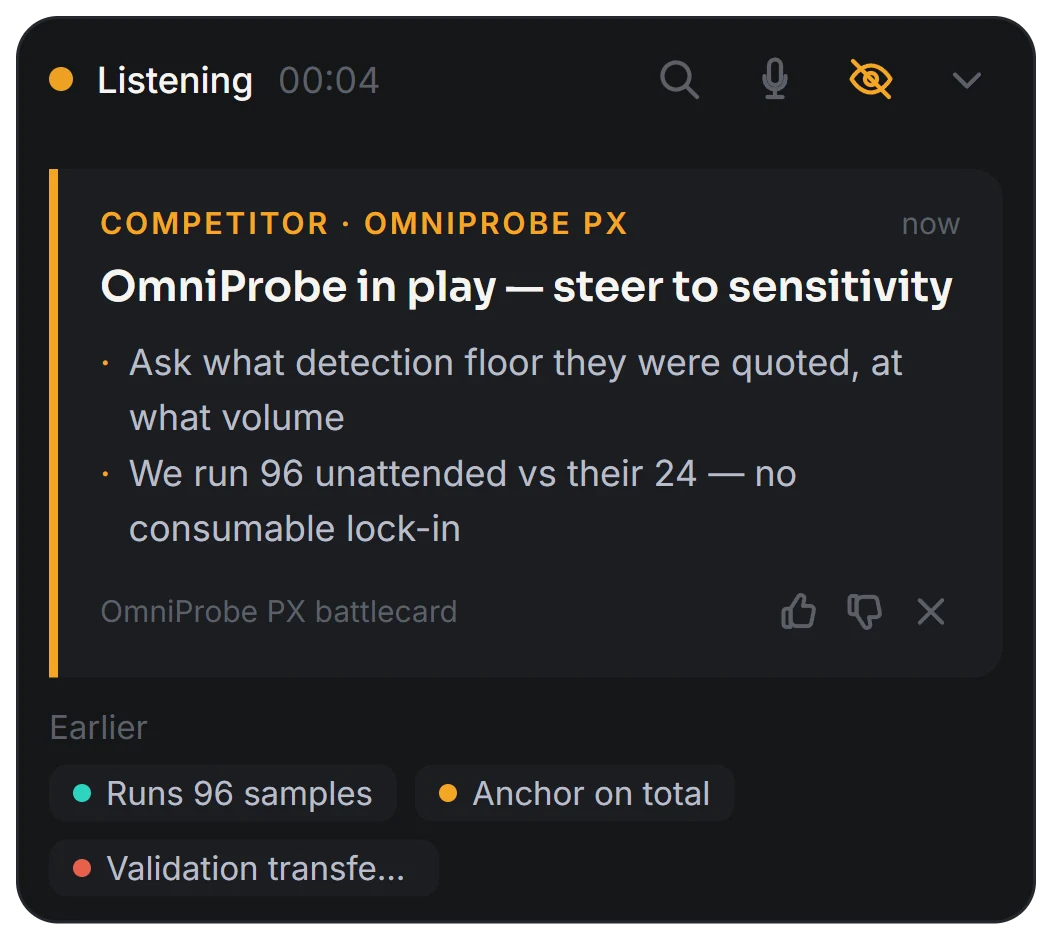
Click start before you dial. CueDeck listens to both sides, spots competitor mentions, technical questions and objections, and puts a small card on your screen with the answer and where it came from.
Send the follow-up
Afterwards you get the transcript with every cue in place, the objections you could not fully answer, and a follow-up email drafted with the right documents already attached.
Before the call
Walk in already briefed.
Connect your calendar and CueDeck researches every outside company on the invite before you meet them. Each morning you get one email covering that day's meetings: who each company is, what they work on, and a few facts worth raising — every one linked to where it came from.
It reads the invite.
CueDeck works out which company each meeting is with from the attendees' email domains. A meeting with a customer and a partner lab on it gets a brief for each.
Cited or left out.
A fact without a source doesn't make the brief. When there's genuinely little to find on a company, the brief says so instead of padding itself out.
One email, each morning.
Only on days a meeting actually has a brief ready, in your own timezone, short enough to read before the first call.
During the call
The answer, while it still matters.
A prospect mentions a competitor. Within a few seconds a card appears: where you win, what to ask next, what not to lead with. It cites the battlecard it came from, so you can say it out loud without wondering whether it's true. One card at a time, never a wall of text, and it disappears when you're done with it.
- Competitor mentions, technical questions, objections and pricing talk
- Under four seconds, start to card
- Ctrl+Space to ask it anything mid-call

It cites. It doesn't invent.
Every cue is built from battlecards you approved and documents you uploaded, and it tells you which one it used. When CueDeck can't find a real answer, it says so instead of producing a confident guess; we'd rather it stay quiet than get you caught out.
- Competitor research with sources, drafted for your review; nothing goes live until you approve it
- Application notes and publications, searchable mid-call

After the call
The call, written down properly.
The transcript reads like a conversation, with each cue sitting exactly where it fired, so you can see what was suggested and what you did with it. Objections CueDeck couldn't answer collect in one place; answer them once and every future call has it. Then the follow-up email, drafted from what was actually said, with the right documents already attached.
- Transcript with cues inline
- Objection inbox that makes the deck smarter
- Follow-up email with attachments picked for you

At the booth
Conference mode: every booth conversation becomes a lead.
Take the same laptop to the show and flip it into booth capture. Start listening when a visitor walks up, stop when they walk away — and the conversation becomes a lead: who they were, what they cared about, and handover notes written for the colleague who'll actually follow up.
Captured, not scribbled.
Name, company, role and interests filled in from the transcript, each tagged as AI-suggested until you confirm it. The one thing it never invents is an email address — that comes off the badge.
Notes a colleague can run with.
What the visitor needs, what was promised in both directions, and how soon they're likely to buy — quoted in their words, and only if they actually said it.
A roster marketing can use.
Every lead lands in the conference's roster, sortable hottest first, exportable to Excel — the whole show or a filtered slice that says exactly what it contains.
Nobody else knows it's there.
CueDeck doesn't join your call, so there's no extra participant and no notification in the corner of the meeting. It listens on your machine the way you do, and it stays hidden from screen shares by default; you can present without exposing it.
No bot in the participant list.
Nothing to explain to the prospect.
Audio is never stored.
Speech becomes text in real time; the recording is never written to disk.
Your workspace is yours.
Every account is isolated at the database level. Your battlecards and calls are not training data.
Recording and consent laws vary by region. You're responsible for complying with the rules where you and your prospect are; CueDeck gives you the controls, not the legal advice.
Running a team? This is a ramp-time problem.
A new rep spends their first months learning where the answers live before they can sell like they know them. CueDeck loads your corpus on day one: the app notes, the battlecards, the publications. A 60-day hire quotes them like a four-year veteran.
Cut ramp time, not corners.
New hires answer from the approved corpus with the source attached, from their first call.
One corpus, every call.
Load the documents once. Everyone quotes the same numbers from the same battlecards you approved.
Your experts stay in the lab.
A $150k application scientist shouldn't be doing lookups on a first discovery call.
Rolling out more than a couple of seats? Email hello@cuedeck.ai and we'll set your team up together.
One plan. Two ways to pay.
Every account starts with 15 free meetings, good for 90 days, no card required. When the trial runs out, upgrade from inside the app — everything above is included either way, and you can cancel anytime.
Monthly
$49/month
- 40 meetings a month
- Live cues, briefs, follow-ups, conference mode
- Cancel anytime
Annual Two months free
$490/year
- Same 40 meetings a month
- Works out to $40.83/month
- Cancel anytime
Know someone already on CueDeck? Sign up through their referral link and your trial starts with 20 meetings instead of 15.
Start free.
15 free meetings, good for 90 days — no card required. Sign up with your work email and your invite lands in your inbox straight away. After the trial, CueDeck is $49/month, or $490/year with two months free.
Check your inbox — your invite is on its way. Follow the link inside to set your password, and you're on your first call about 15 minutes later. Nothing after a few minutes? Email hello@cuedeck.ai and a human will sort it.
Questions
No. CueDeck never joins the call as a participant, so there's no bot in the list and no notification. It also stays hidden if you share your screen.
It transcribes in real time and keeps the text. The audio itself is never saved: not to your machine, not to our servers.
Yes, and anything else that makes sound. CueDeck listens to your microphone and your computer's audio, so it doesn't care which platform you're on.
No. Speakers work; CueDeck tells your voice from theirs even when they're bleeding into your microphone. A headset still gives the cleanest transcript in a noisy room.
Every cue shows the document it came from, so you can judge it before you say it. Rate it with a thumb and it feeds back into what you approve. And when CueDeck doesn't know, it says so rather than guessing.
They're stored in your own isolated workspace, used to answer your calls and attach to your follow-ups, and nothing else. They're not shared between accounts and never used to train models.
Windows today, on both Intel and ARM machines. Mac is next.
Every account starts with 15 free meetings, good for 90 days, no card required. After that, CueDeck is $49/month for 40 meetings — or $490/year, which is two months free. You upgrade from inside the app; the site never asks for a card.
Cluely tells you what to say. CueDeck finds what your company already wrote (the app note, the battlecard, the publication) and puts it on screen with the source, so you're quoting your own documentation instead of trusting a guess. Every answer traces to a document your team approved, which is also why it survives procurement.